
Spoken audio to live text.
In any language, straight to mobile screens.
fluent.church makes spoken audio available in real time as text in any language on your congregation's mobile devices—enabling anyone who cannot understand the spoken word, whether due to impaired hearing or language barriers.
Include Everyone in the Message.
$1/hour. Prepaid. Zero commitments.
Fair, usage-based pricing with zero hidden recurring fees.
Sign up for a free trial. When you are ready, continue with pre-paid hours without surprise subscriptions or auto-renewals.
We do not charge you if there are no visitors connected to your broadcast.
We do not charge you for silent pauses or intervals between speakers.
Pre-paid credit balances that stay yours, with zero forced monthly retainers.
How It Works
Route your live audio through fluent.church for instant, multi-language delivery on mobile devices.
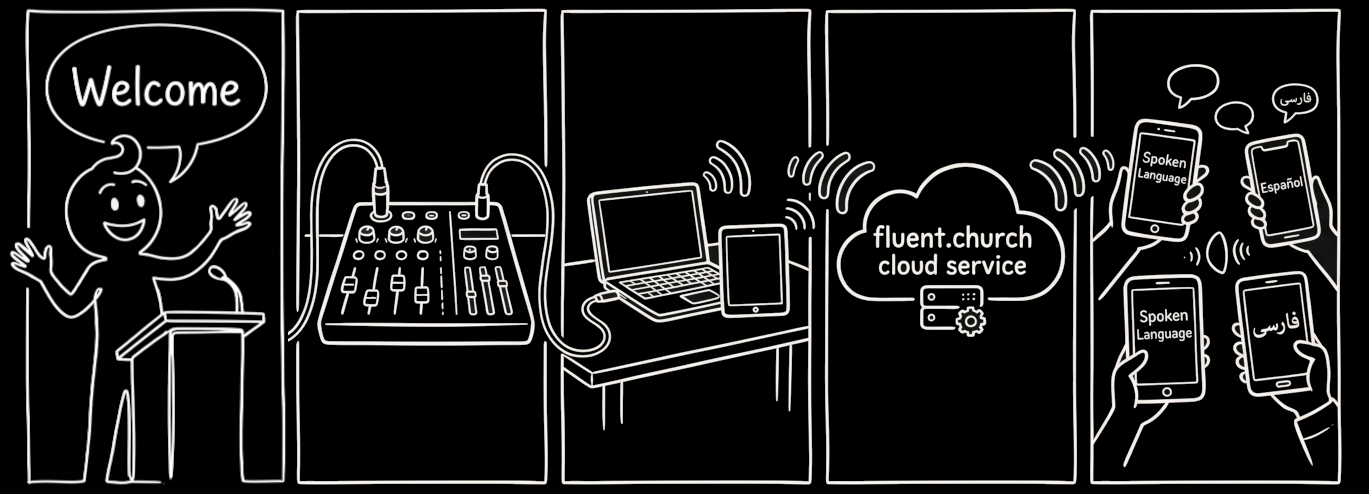
Spoken audio capture
Audio from your existing sound equipment is sent to fluent.church running on a browser.
Live processing
fluent.church transcribes the audio to text, and translates it.
Audience delivery
Captions stream live onto audience screens in their selected language for self-service reading, with optional on-device voice translation directly through personal headphones.
Get Started
Follow this simple onboarding checklist to get set up.
What You'll Need
An audio source
A microphone, or a mixing console that can output audio with spoken word.
A broadcast device
A tablet, phone or computer with an Internet connection and a browser. The broadcast device has to be connected to your audio source.
A Google or Microsoft account
To create a fluent.church account, you will need to log in with a Google or Microsoft account.
What You Need to Do
Sign up
At first login, an account will be created with 4 hours of broadcast time to use with your congregation over the coming 30 days.
Start broadcast
Instruct your audio engineer to turn on the broadcast every time.
Spread the word
Let your audience know you are transcribing. Print QR codes or URLs at the entrance, on your website, in your newsletter and on the pre-service screens.
Frequently Asked Questions
Everything you need to know about live captioning and multilingual translation.
Do congregation members need to download an app or register?
No. Attendees simply scan a QR code with their mobile phone or visit fluent.church/@yourname. There is no app to install, no account to create, and no personal data collected from your audience.
Can we use our own church website address (custom domain)?
Yes. In addition to your default address at fluent.church/@yourname, you can connect your own subdomain (such as captions.yourchurch.org) via a simple DNS CNAME record at no extra cost. SSL certificates are provisioned automatically.
How does this compare to hearing loop or Auracast systems?
Traditional induction loops and Auracast are of great help for those with hearing aids. Those who cannot benefit from hearing aids, or those who do not understand the spoken language, are not helped by these systems. fluent.church is a supplement to, not a replacement of, hearing loops or Auracast, streaming live text directly to the smartphones attendees already carry.
How does usage-based pricing work?
fluent.church pricing starts at $1 per broadcast hour using pre-paid hours. You are only charged when you broadcast to active listeners; periods of silence and broadcasts without connected attendees are free. There are no monthly subscription fees, commitments, or auto-renewals. Pre-paid hours expire 1 year after purchase, but are extended if additional purchases are made.
Which languages are supported?
fluent.church supports real-time transcription across more than 60 spoken languages, and instant translation into 100 languages simultaneously. Each attendee can independently choose their preferred language on their personal screen.
What hardware or sound equipment is required?
A laptop, tablet, or phone with an internet connection and a web broswer (Firefox, Chrome or Safari) will work. While you can capture directly from your device's microphone, you will get much better results with an audio feed from your sound system. Best results are achieved if you connect an aux or subgroup feed from your mixing console via a simple USB audio interface or XLR-to-USB adapter. Because the broadcast automatically pauses (no charge) during silence, muting the microphone during periods of non-speech saves your broadcast hours.
How fast is the transcription?
The live text is broadcast with a latency of usually only a few words. Translation has a slight delay as we translate once there is a complete sentence.
Can we display captions on our video live stream (OBS, vMix, ProPresenter) or sanctuary screens?
Yes. fluent.church includes a dedicated lower-third overlay page (/overlay.html) designed specifically for OBS Studio, vMix, and ProPresenter. It provides a 100% transparent background with semi-transparent caption boxes, smooth line rollups, and auto-hide on silence. You can customize language, lines, font size, and positioning via query parameters or use the interactive Overlay Studio to preview and copy your browser source URL.
About fluent.church
fluent.church is a service built on a vision to make God known to everyone regardless of hearing impairment, origin, ethnicity, or mother tongue, at an affordable price.
I originally built this system while serving as a church audio technician. A friend with severe hearing loss was consistently struggling to understand the spoken word during services, and our standard induction loop just wasn't enough. I thought that if TVs could have live captions, so could the church.
Today, fluent.church is operated on the sidelines. My goal is to run this as a sustainable, affordable service. By keeping operations lean—which means a 24/7 support desk is not available—I can provide this tool to churches at a low, straightforward price point. It is built to simply work, so you can focus on the service.
— Kristofer Tingdahl
Tingdahl IT Management AB